Maintaining multiple Snowflake accounts can create operational overhead, duplicated administration, and challenges with cross-environment testing. This article outlines an alternative approach: a single-account architecture that provides environment isolation, controlled access to production data, and on-demand testing environments.
What Each Environment Is Actually For
The Rule That Makes One Account Safe
Separating Where a Job Runs From Where It Reads
Keeping Three Sets of Schemas in Sync
Spinning Up Environments on Demand
For a while, testing didn’t really have a home of its own. If you wanted to check something against data that looked real, the honest answer was often “run it against prod, carefully” because nothing else had data trustworthy enough to make the test mean anything. That’s a bad habit wearing shortcut clothes: it only takes one careless script or one forgotten filter to turn a quick check into a production incident. On top of that, different kinds of testing wanted different things. Оngoing integration testing needed to catch breaking changes before they shipped, engineers doing local work needed a sandbox, and automated suites needed runs that were fully isolated from each other. None of that was ever going to be safe if “testing” just meant “somewhere near production, if you’re careful.”
So, we set out to give every kind of testing a real home of its own — production itself, a staging environment for integration and end-to-end testing, a shared dev sandbox, and an on-demand environment for automated tests, without multiplying the number of Snowflake accounts we had to run. Separate accounts per environment would have made cross-environment queries and day-to-day maintenance harder than they needed to be. That meant isolation had to come from naming and access rules instead of from separate infrastructure, and most of what follows is what that constraint forced us to decide.
What Each Environment Is Actually For
Prod runs production workloads against real, continuously flowing data. It’s one shared environment for everything downstream of it, and it’s the only one with a formal SLA and an on-watch engineer attached to it.
Staging carries its own 24/7 flow of staging data, generated by staging clients and scripts and kept in its own object space rather than mixed with prod’s. Its job is to be the place where upcoming, potentially breaking changes on the data or client side get integration-tested before they ever reach production, which only works if its schemas are kept up to date with prod’s. It has no formal SLA today, though we’ve gone back and forth on whether it deserves at least a partial one, since some of what runs there ends up needing to run around the clock too.
Dev is a shared sandbox for ad-hoc testing from local machines, against tables shaped like prod’s current schema. Because it’s shared, concurrent test runs can step on each other. That’s a known trade-off, not an oversight. Anything that actually needs isolation is supposed to move to it instead.
It exists specifically for integration tests, manual or automated. It gets created on demand through a stored procedure and torn down right after, with schemas tailored to whatever scenario is running. It’s the one environment where we get real isolation, because it’s also the only one we create fresh and throw away every time.
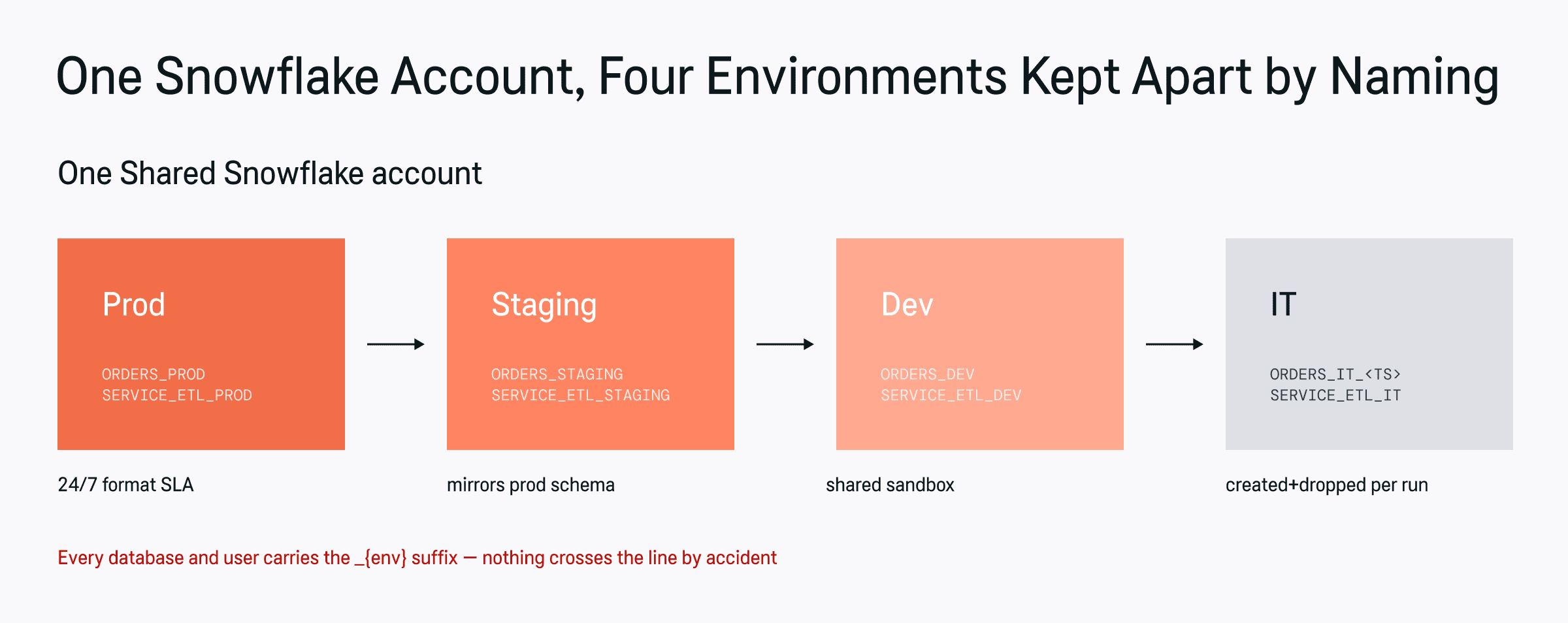
Four environments, one account — kept apart entirely by naming and access rules, not by separate infrastructure.
The Rule That Makes One Account Safe
Sharing a single account only works if the boundaries between environments are non-negotiable, so we made a small number of rules absolute rather than conventional:
- Every environment gets its own dedicated database and its own users, with _{env} added as a suffix to both, never a shared database split by convention alone.
- Prod users never touch non-prod environments. Not for convenience, not temporarily.
- A component can write within its own environment, at most never into another one, even one it’s allowed to read from.
- Vault secrets carry the full connection details for a given environment, database, warehouse, everything, so there’s no computational bleed between environments through a shared credential.
Separating Where a Job Runs From Where It Reads
The part of this that took the most thought: some staging and dev test scenarios only mean something if they run against real prod data, think full functional or performance testing, but that can’t come at the cost of writing into prod, ever.
So we split the idea of “environment” into two independent concepts. The target (or execution) environment is fixed for a given run. It’s where the job actually executes and the only place it’s allowed to write. The source environment is just a parameter, and it’s allowed to differ from the target: a job executing in staging can be told to read from prod, read-only, without ever being allowed to write there.
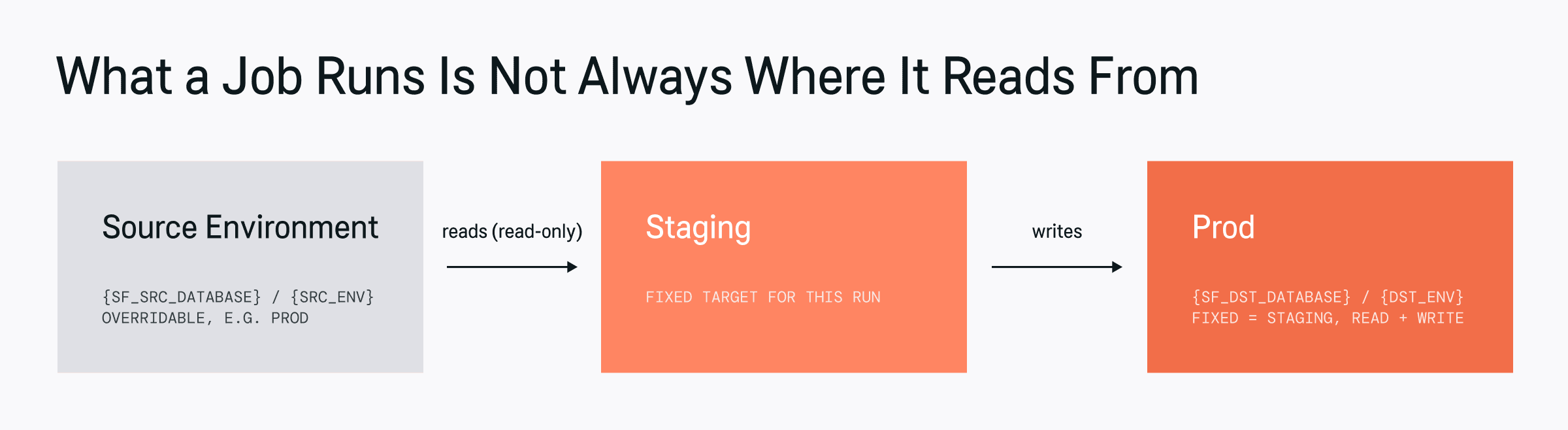
The target environment is fixed for the run. The source is just a value you pass in — swap it and the same job reads from somewhere else.
We wanted the SQL itself to be indifferent to which source it’s pointed at, so the substitution happens through query parameters — {SF_SRC_DATABASE} or {src_env} for what to read from, and {SF_DST_DATABASE} / {dst_env} / {env} for what to write to, with a command-line or job parameter controlling the actual value at run time.
-- the query never changes; only the parameters do

SELECT *

FROM {SF_SRC_DATABASE}.gold.orders

WHERE order_date >= CURRENT_DATE - 7;

-- run against the normal case: everything in staging
--   dst_env = staging   (fixed — where this job runs and writes)
--   src_env = staging   (default — reads its own environment's data)


-- run as a real functional test: read live prod data, still write to staging
--   dst_env = staging   (fixed — where this job runs and writes)
--   src_env = prod       (overridden — reads prod, read-only)
One consequence worth stating plainly: Snowflake doesn’t support anything like a local testing deployment. Any “local” testing scenario has to run against the dev environment instead of an actual local database, and automated tests use it for the same reason.
Keeping Three Sets of Schemas in Sync
Staging, dev, and it all need schemas that track prod, and we didn’t want to hand-maintain that in three places. The fix was a Continuous Migration setup: a single source of truth for every table model, defined as DDL or DBT model files in one repository, with a dedicated place in that same repo for the changesets applied to each environment. Non-prod tables get created with the TRANSIENT modifier, since none of them need prod’s full fail-safe and time-travel guarantees.
Deployment runs through three separate CD jobs, and all three are triggered manually on purpose: a dev job runnable from any feature branch, a staging job runnable from any feature branch, and a prod job restricted to main only. The prod job is the one that actually fans out. It applies the same change incrementally to prod, incrementally to staging, and to dev either incrementally or as a full table replacement. Keeping every trigger manual was a deliberate choice: it means a person decides the moment a potentially destructive change actually lands, rather than a pipeline deciding it automatically.
Spinning Up Environments on Demand
Dev and it environments both get created through automation rather than by hand, but for different reasons. A dev environment on demand is a CI/CD job, triggered manually, that takes an optional feature name (defaulting to the current branch) and a clone flag. It exports the current feature branch’s table models to a bucket and calls a stored procedure that either creates a fresh database from those models or clones prod outright, depending on the flag, then hands back the resulting database name.
An it environment works the same way in spirit but is owned by the integration test framework itself: it calls its own stored procedure to get a freshly created, empty, prod-shaped database, populates whatever the test needs, and is responsible for dropping that database when the run finishes.
-- spin up an isolated dev environment for a feature branch
CALL config.public.create_dev_environment(feature_name => 'checkout-fix', clone => false);
-- creates fresh tables from the current models, returns:
--   dlh_dev_checkout_fix

-- or clone prod outright, to debug against a frozen, deterministic snapshot
CALL config.public.create_dev_environment(feature_name => 'bug-4821', clone => true);
--   dlh_dev_bug_4821  (full clone of prod at the moment it was called)

-- spin up an isolated environment for one automated integration test run
CALL config.public.create_it_environment();
-- creates an empty, prod-shaped database, returns:
--   DLH_IT_20250312143000
The clone option earns its keep during incident response. When a production bug only reproduces with a specific, hard-to-describe state, cloning prod into a disposable dev environment freezes that state at a single point in time, which turns a moving target into something you can actually debug against and then throw away.
The Read-Only Apps Sitting on Top
Two internal applications: an internal back-office tool and a reporting dashboard sit on top of this and only ever need read access to prod. Each gets its own dedicated service user per environment (service_bo_{env}, service_reporting_{env}), so neither app nor environment shares credentials with the other.
Their staging-facing users are the one exception to strict environment isolation: they get access to both staging and prod, specifically so the same source/target distinction described above still applies to them. By default, the source maps to prod unless a launch or query parameter says otherwise.
What We Got Out of It
None of this was free to build, but it paid off in ways worth naming directly rather than leaving implied.
Maintenance and testing got simpler almost immediately. Every environment follows the same naming and isolation rules, so onboarding a new pipeline or debugging a broken one doesn’t mean relearning a bespoke setup each time. The pattern is documentation.
It’s also meaningfully cheaper. We no longer need to keep staging and dev warehouses running 24/7 just in case someone needs to test something on top of prod data. Environments spin up on demand and disappear when they’re done, and a real functional test can point at live prod data any time it needs to instead of waiting on a scheduled sync. That shows up directly in Snowflake TCO, not just in convenience.
And it scales without reopening old risks. Every new environment, team, or test scenario gets the same guarantees — full data isolation, no shared credentials across environments, so extending this pattern doesn’t mean re-litigating the security questions we already answered once.